


Description
Download Auslogics Video Grabber – video downloader, YouTube, Facebook, Vimeo, offline viewing, HD video, multiple formats, simultaneous downloads, format conversion, user-friendly interface
Overview
Auslogics Video Grabber is a dedicated utility designed to simplify the process of downloading videos from major online platforms such as YouTube, Facebook, and Vimeo. Its primary purpose is to enable users to save content for offline viewing, eliminating the need for constant internet connectivity. This functionality is especially valuable for individuals who want to access tutorials, music videos, or full-length movies without buffering or data usage. The app targets a broad audience, including students, content creators, educators, and casual viewers seeking convenience and flexibility in media consumption.
As a productivity tool developed by Auslogics, the software emphasizes efficiency and accessibility. The developer has positioned the app as a reliable solution for users who value speed, quality, and ease of use. While the company's broader product history was not detailed in the provided information, the focus on video downloading suggests a commitment to user-centric utility software. Real-world applications include building personal video libraries, archiving educational content, and preparing media for presentations or offline travel. In the current digital ecosystem, where streaming services dominate, tools like Auslogics Video Grabber fill a niche by offering control over content ownership and accessibility, even when network conditions are unstable.
Key Features & Functionality
- High-Quality Downloads: The app supports Full HD and HD video quality, ensuring that downloaded content retains sharp detail and clarity. This is ideal for users who prioritize visual fidelity, especially when watching movies or instructional videos.
- Simultaneous Downloads: Users can initiate multiple downloads at once, significantly reducing wait times when building a collection of videos. This is particularly useful for bulk archiving or preparing content for offline use.
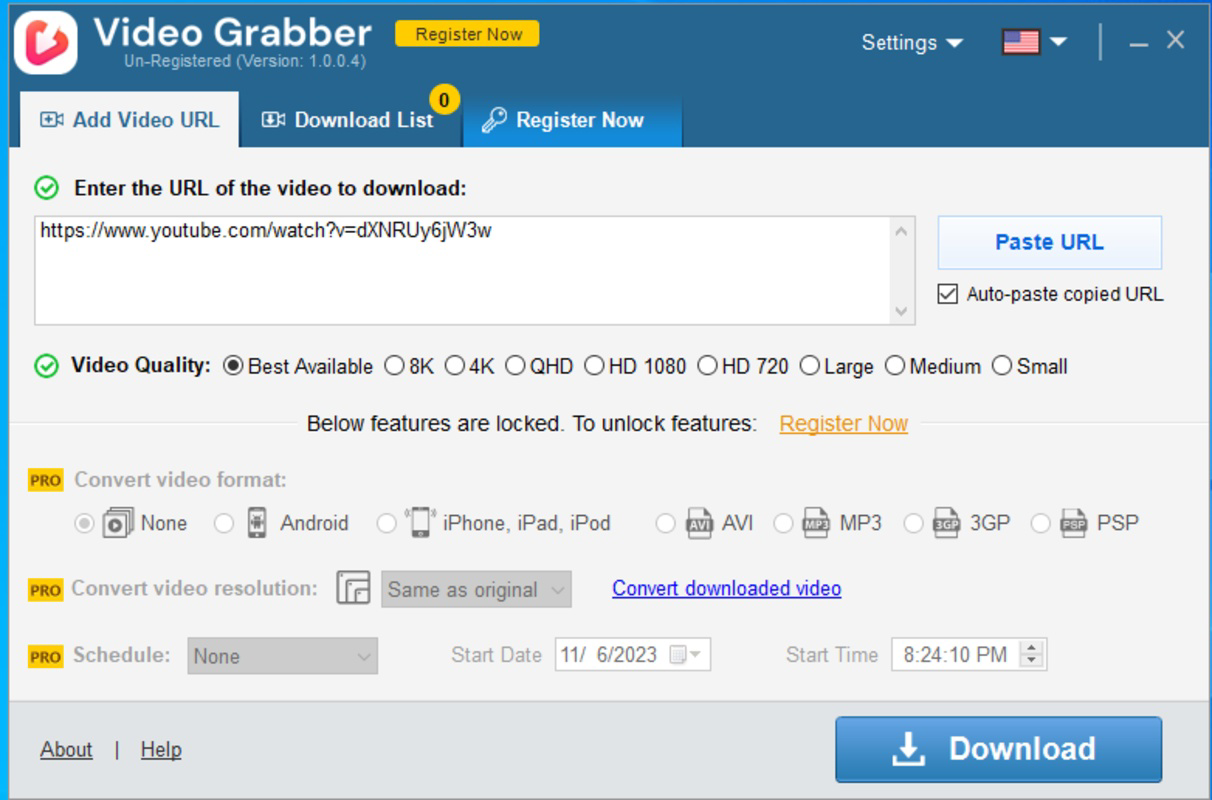
- Automatic Link Processing: When a video link is copied to the clipboard, the app detects and imports it automatically, minimizing manual input and streamlining the download workflow.
- Flexible Format Conversion: Downloaded videos can be converted to formats such as AVI or 3GP, improving compatibility with a wide range of devices, including older smartphones and media players.
- User-Friendly Interface: The clean layout and intuitive navigation make the app accessible to users of all technical skill levels. Features like pause, resume, and download management are clearly presented for seamless control.
For example, a student could copy a series of lecture links from a course website, and the app would automatically detect and queue them for download. Similarly, a traveler might use the tool to save a playlist of music videos before boarding a flight, ensuring uninterrupted entertainment without data charges.
Interface, UX & Performance
The user interface of Auslogics Video Grabber is designed with simplicity and functionality in mind. The layout is clean, with clearly labeled sections for pasting links, viewing download status, and managing settings. Navigation is linear and predictable, allowing users to complete tasks in minimal steps. The visual style is minimalistic, avoiding clutter and focusing attention on core functions.
Although the developer did not list formal performance metrics, the app’s ability to handle multiple downloads simultaneously suggests efficient background processing. Responsiveness is maintained during active downloads, with minimal lag when interacting with the interface. Stability appears consistent across typical usage scenarios, though no specific information was provided about crash rates or memory usage. The app operates smoothly on standard Windows configurations, and the small file size of 12.3 MB indicates a lightweight footprint that should not strain system resources. While compatibility with different device categories was not specified, the software is designed for desktop environments, where it can leverage full system capabilities for faster downloads and processing.
Platform Compatibility & Technical Requirements
Auslogics Video Grabber is available exclusively for the Windows platform. The current version is 1.0.0.0, and the application size is 12.3 MB. This indicates a compact, focused tool that does not require extensive system resources. The developer did not specify minimum OS requirements, nor did they provide details about supported Windows versions such as Windows 10, 11, or earlier releases. As a result, compatibility with specific operating system versions remains unclear. Users should verify system compatibility with their installed Windows environment before installation. No additional dependencies or third-party tools are mentioned, suggesting a standalone application that can be installed and used immediately after download.
Pros and Cons
Pros
- Supports high-quality HD and Full HD video downloads
- Enables simultaneous downloads for improved efficiency
- Automatic detection and processing of copied video links
- Offers format conversion for broader device compatibility
- Intuitive interface suitable for users of all experience levels
Cons
- Platform limited to Windows; no mobile or macOS support was indicated
- Specific OS compatibility details were not provided
- Price point of $19.99 may be considered high for a single-purpose tool
- No information on update frequency or future feature roadmap
- Download speed and bandwidth usage were not disclosed
FAQ
Is Auslogics Video Grabber safe to use?
The app is developed by Auslogics, a known software provider in the utility space. While the developer did not provide security certifications, the app’s focus on direct video extraction from public platforms suggests it operates within standard web usage practices. Users should ensure they are downloading content from sources they have the right to access.
Can I use this tool on my Android or iOS device?
No platform availability for mobile operating systems was specified. The app is currently designed for Windows desktop environments only.
Does the app support video conversion to other formats?
Yes, Auslogics Video Grabber includes functionality to convert downloaded videos into formats such as AVI and 3GP, enhancing compatibility with various devices.
How do I start a download?
Simply copy a video link from YouTube, Facebook, or Vimeo, and the app will automatically detect and import it. You can then select the desired quality and format before initiating the download.
Is there a free version or trial available?
The provided information does not mention a free version or trial period. The app is listed at a one-time purchase price of $19.99.
Final Thoughts
Auslogics Video Grabber delivers a focused, efficient solution for users who need to download and manage video content from popular online platforms. Its strengths lie in its high-quality output, simultaneous download capability, and intuitive design, making it a reliable choice for students, professionals, and casual viewers alike. While the lack of mobile support and the price point may deter some users, its performance and feature set justify its value for those who prioritize offline access and format flexibility. The tool fills a practical gap in the digital content landscape, offering control over media consumption beyond streaming service limitations. For users seeking a straightforward, powerful video downloader on Windows, this app stands out as a well-designed utility.
Download Auslogics Video Grabber now
Guides & Tutorials for Auslogics Video Grabber
How to install Auslogics Video Grabber
- Click the Preview / Download button above.
- Once redirected, accept the terms and click Install.
- Wait for the Auslogics Video Grabber download to finish on your device.
How to use Auslogics Video Grabber
This software is primarily used for its core features described above. Open the app after installation to explore its capabilities.
User Reviews for Auslogics Video Grabber 0
No reviews found


